Please allow ~4-6 weeks to dispatch from Australia for quality control. Only 4 devices per customer may be shipped each day, so orders placed for more than 4 devices will be shipped over multiple days.
Products containing Lithium-Ion batteries (laptops and smartphones) are subject to extra safety requirements and are experiencing further delays.
If you are ordering a device that does not include a Windows 11 licence as standard, please check Microsoft's minimum system requirements to confirm if it can be upgraded later should you wish to do so.
Product images are for illustrative purposes only and may contain AI-generated content. They do not represent the exact product that is subject to the cosmetic grading policy detailed here.
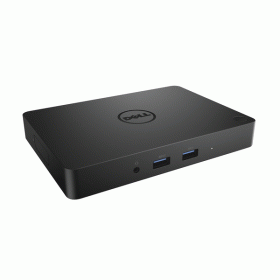
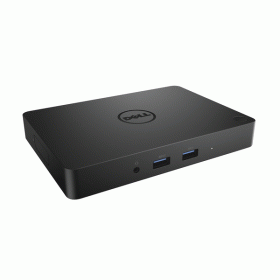
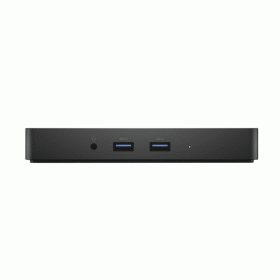
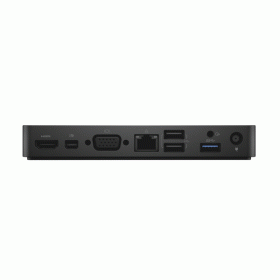
Refurbished Dell WD15 USB-C Business Docking Station — Power Adapter Not Included
Expand your Dell laptop into a full workstation with the WD15 — HDMI, VGA, Mini DisplayPort, 5× USB, Gigabit Ethernet and audio through one USB-C cable, from $29 inc-GST with a 12-month warranty from Reboot IT. Note: a compatible Dell 130W USB-C power adapter is required separately and is not included.
Why Choose the Dell WD15 Docking Station?
- Single-Cable Desktop Expansion: One USB-C connection to your laptop instantly activates all peripherals, displays, and network — no daily cable management.
- Triple External Display Support: HDMI, VGA, and Mini DisplayPort run simultaneously for up to three monitors, ideal for financial, design, or multi-app workflows.
- Five USB Ports: Three SuperSpeed USB 3.0 (5Gbps) and two USB 2.0 ports connect keyboards, mice, external drives, and printers concurrently.
- Gigabit Ethernet: Stable 1000Mbps wired connection delivers reliable throughput for video conferencing, large uploads, and cloud applications.
- Dedicated Audio I/O: 3.5mm headphone output and microphone input support clear conference calls without consuming USB ports.
- Professionally Refurbished: Each unit passes Reboot IT's connectivity and port-function testing before dispatch, ensuring reliable day-one performance.
Performance in Daily Business Use
The WD15 suits office professionals who need a consistent, reliable desktop setup every day. Connect your Dell laptop once in the morning and your dual monitors, keyboard, mouse, USB headset, and wired Ethernet are all live immediately. The dock handles mixed-workload demands — spreadsheets, Zoom calls, and large file transfers — without port contention or dropouts.
Hot-desk environments benefit most: each desk needs only the dock, and staff bring their laptop. This eliminates the need for separate USB hubs, audio adapters, and display adapters at every station. Three display outputs also suit users who span content across extended screen configurations for coding, financial analysis, or trading dashboards.
Technical Specifications
| Model | Dell WD15 USB-C Docking Station |
| Host Connection | USB-C (single cable to laptop) |
| USB 3.0 Ports | 3 × SuperSpeed USB 3.0 (5 Gbps) |
| USB 2.0 Ports | 2 × USB 2.0 (480 Mbps) |
| Display Outputs | 1× HDMI, 1× VGA, 1× Mini DisplayPort (max 3 monitors) |
| Network | 1 × Gigabit Ethernet RJ-45 |
| Audio | 3.5mm Headphone Out + 3.5mm Microphone In |
| Power Adapter | Not included — Dell 130W USB-C adapter required (sold separately) |
| Compatible Laptops | Dell XPS, Latitude 5xxx/7xxx, Precision with USB-C/Thunderbolt 3 (2016+) |
| Dimensions / Weight | 206 × 81 × 28 mm / approx. 635 g |
Is the Dell WD15 Right for You?
|
✓ Best For: • Dell USB-C laptop users needing a multi-monitor desk setup • Hot-desking environments needing fast dock/undock • Users who want wired Ethernet and a USB hub combined • Budget-conscious buyers upgrading from USB-A docks |
✗ Not For: • Non-Dell laptops or older USB-A only machines • Thunderbolt 3 4K or high-refresh gaming use cases • Users expecting laptop charging included out of the box • Setups needing only a single display connection |
Condition Grades
| A — Excellent | Minimal wear — no visible scratches, ports clean and undamaged |
| B — Good | Light surface marks from normal office use — fully tested and functional |
Frequently Asked Questions
Is the power adapter included with this dock?
No — a Dell 130W USB-C AC adapter is not included and must be purchased separately. The dock will pass data and drive displays without it, but laptop charging requires the adapter.
Which Dell laptops work with the WD15?
Compatible with Dell XPS 13/15, Latitude 5000/7000 series, and Precision models with USB-C or Thunderbolt 3 ports from 2016 onwards. Check your laptop's USB-C specification to confirm.
Can I use all three displays simultaneously?
Yes — HDMI, VGA, and Mini DisplayPort can all operate at once, giving up to three external monitors alongside your laptop screen for a four-display configuration.
What data transfer speeds do the USB ports support?
The three USB 3.0 ports deliver SuperSpeed 5 Gbps for external SSDs and high-speed peripherals. The two USB 2.0 ports provide 480 Mbps for keyboards, mice, and similar accessories.
Does the dock need drivers?
The WD15 is largely plug-and-play on Windows 10/11 with Dell laptops. Installing Dell's WD15 driver package (free from Dell's website) is recommended for full display and power management functionality.
Warranty & Support
Every Dell WD15 sold by Reboot IT includes a 12-month warranty covering all ports, connectivity, and hardware components. Based in Melbourne and operating since 2001, Reboot IT provides Australian-based support for all warranty claims.
Visit reboot-it.com.au or contact our team directly with your order details for warranty service, technical questions, or bulk enquiries.
| Brand | Dell |
| Bundle Description | Includes Adapter |
| Colour | Black |
| Custom Bundle | No |
| Item Height | 19mm |
| Item Length | 155mm |
| Item Width | 65mm |
| Manufacturer Warranty | 3 Months |
| Model | WD15 |
| MPN | None |
| Compatible Brand | For Dell |
| Compatible Laptop Size | None |
| Compatible Model | None |
| Compatible Product Line | None |
| Cooling Type | None |
| Features | AC-Powered|Built-In USB Port |
| Material | Plastic |
| Ports | DisplayPort|HDMI|USB 3.0|Ethernet (RJ-45)|USB-C |
| Type | USB-C Docking Station |
Refurbished Computers - Cosmetic Grading Guide
Our supplier's refurbished hardware is typically graded either "Excellent" or "Good", however, some legacy products were graded under a letter grading system (A, B, C). Please find the definitions for each grade below and contact us if you're uncertain of a device's grade.
Used Smartphone / Refurbished Mobile Phones
"Excellent" Grade
Devices in this category appear like new, with very minor wear. Expect light or fine scratches on the screen that are shallow enough not to catch on a fingernail. The edge around the glass is virtually flawless, save for possible light scratching around the power port. The back plate may show light/fine scratches, including on the Apple logo, with any discoloration being minimal.
"Good" Grade
These devices are characterized by being fully tested and functional even if they have body scratches, minor paint chips, or a small hairline crack on the screen. Screens are free from dead pixels but may exhibit slight scratching from moderate use.
Refurbished Desktops, Laptops and Monitors
"Excellent" Grade - Laptops
Reserved for units that show barely any signs of previous use, these laptops may exhibit very minor scuffing or abrasions, associated only with minimal standard use. The keyboards show light wear, and importantly, the screens are pristine, free from any scratches, cracks, chips, dead pixels, dark spots, discoloration, or blemishes.
"Excellent" Grade - Desktops
Desktop PCs in the "Excellent" grade category are free from deep scratches, cracks, paint chips, or any broken/missing pieces, ensuring a sleek and almost-new aesthetic.
"Excellent" Grade - Monitors
"Excellent" grade is reserved for units that show evidence of very little to no previous use. Any wear on an "Excellent" Display, including housing/frame and/or external surfaces (i.e. Frame) is associated with standard minimal use. "Excellent" units may have minor scuffing and / or minor abrasions on plastics with from standard light previous use."Excellent" Displays will feature no scratches, cracks, chips, dead pixels, dark spots, discoloration or blemishes. Units will only feature the standard minimal wear and tear that is associated with a used unit.
"Good" Grade - Laptops
"Good" laptops may feature one or several small dings or dents on covers and / or small paint chips on the surface or small hairline cracks in the bezel. Laptop screens may feature uneven light diffusion in screen and may feature subtle blemishes. "Good" Laptops will not feature cracks screens but may feature slight scratching, dead pixels or white spots on the screen.
"Good" Grade - Desktops
"Good" grade desktops may have light scratches on external body and may feature more excessive unit housing and/or external case wear than "Excellent" units, including wear on case / lid. "Good" PCs may feature one or several small dings or dents on covers and / or small paint chips on the surface.
"Good" Grade - Monitors
Displays in the "Good" grade have been fully tested and are functional but may include scratches on body, small paint chips, minor cracks on body, loose and/or wobbly bases. "Good" Display screens may feature uneven light diffusion in screen and may feature subtle to moderate blemishes. "Good" Displays will not feature cracks on screens but may feature slight scratching on screen surfaces from moderate use or wear, dead pixels or white spots on the screen.
Legacy letter grading
Used Smartphone / Refurbished Mobile Phones
A Grade
- No chips, scratches or cracks on the front glass and housing
- No missing or alternative parts
- No sign of liquid damage
- Battery cannot be swollen
B Grade – Same as A Grade except:
- May have light scuffs but no chips or cracks
- Light scratches on housing or front glass
C-Grade – Same as B Grade except:
- Unlimited long shallow scratches on the front glass
- No chips or cracks on the front glass
- Unlimited scratches, chips/dents on back cover housing and corners
- Minor cracks allowed
- Customized housing and aftermarket covers allowed
Refurbished Desktops, Laptops and Monitors
A-Grade
- Overall excellent to very good cosmetic condition. Some may be pristine, others may have light scratches or minor blemishes
- Laptops may have some shiny areas around the keyboard such as the space bar, touchpad or touchpad buttons
- Keyboard keys will be in excellent condition
- Laptop and monitor screens will be blemish free
- Cosmetic blemishes will not impact the overall functionality or performance of the device
B-Grade
- Will have some cosmetic blemishes that include scratches and/or other imperfections
- Minor scratches and dents on the housing
- Laptops may have shiny keys or shiny surfaces around the keyboard however all characters will be legible
- Laptop and monitors screens will have imperfections such as minor scratches, minor chips and/or white spots. There will be no cracking on the screen
- Have the same warranty as A Grade
- Pricing will be cheaper than A Grade
C-Grade
- Same as B-Grade except may have unlimited scratches/blemishes on the screen
- May have cracks/chips or dents on the housing
- Have the same warranty as A Grade
- Pricing will be cheaper than B Grade