Please allow ~4-6 weeks to dispatch from Australia for quality control. Only 4 devices per customer may be shipped each day, so orders placed for more than 4 devices will be shipped over multiple days.
Products containing Lithium-Ion batteries (laptops and smartphones) are subject to extra safety requirements and are experiencing further delays.
If you are ordering a device that does not include a Windows 11 licence as standard, please check Microsoft's minimum system requirements to confirm if it can be upgraded later should you wish to do so.
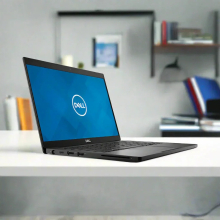
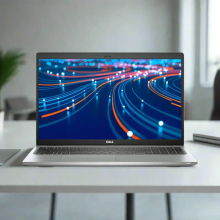
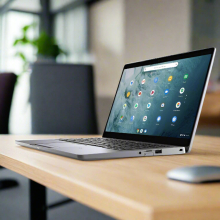
Product images are for illustrative purposes only and may contain AI-generated content. They do not represent the exact product that is subject to the cosmetic grading policy detailed here.
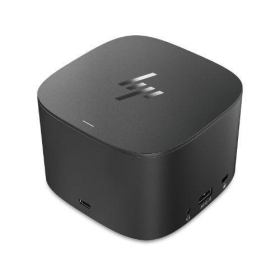


The HP Thunderbolt Dock 120W G2 (2UK37AA) is a premium enterprise-grade docking station that transforms any Thunderbolt-compatible laptop into a powerful workstation hub. With support for up to three 4K displays simultaneously, 100W power delivery to compatible HP laptops, Gigabit Ethernet, and multiple USB-A and USB-C ports, this refurbished dock provides comprehensive connectivity in a compact 98×98×69mm footprint. Each unit is professionally refurbished by Reboot IT and backed by a comprehensive 12-month warranty.
What Makes the HP Thunderbolt Dock 120W G2 a Premium Docking Station Choice?
- Triple 4K Display Support: Drive up to three 4K monitors at 60Hz simultaneously via DisplayPort 1.4, VGA, and USB-C DisplayPort Alt Mode, enabling expansive multi-monitor workflows for design, financial analysis, and data visualization tasks.
- High-Power Laptop Charging: Delivers up to 100W power delivery to compatible HP laptops (75W for non-HP devices) through Power Delivery 3.0 profiles, eliminating the need for separate laptop chargers during docked operation.
- Enterprise-Grade Thunderbolt 3 Connectivity: Single 0.7m Thunderbolt cable provides 40Gbps data transfer speeds while simultaneously carrying video, power, and network signals to and from your laptop.
- Comprehensive Port Selection: Features 4× USB-A 3.0 ports (one with power charging), 2× USB-C ports with 15W power output, Gigabit Ethernet, combo audio jack, and dual DisplayPort 1.4 outputs for maximum peripheral compatibility.
- Compact Professional Design: Space-efficient square form factor with integrated power button, LED status indicator, and Kensington security lock slot makes it ideal for desk setups where space is at a premium.
- Verified Reboot IT Refurbishment: Each dock undergoes comprehensive testing of all ports, display outputs, power delivery functions, and Thunderbolt connectivity to ensure reliable enterprise-level performance.
How Does the HP Thunderbolt Dock 120W G2 Perform in Daily Professional Use?
The HP Thunderbolt Dock 120W G2 excels in demanding professional environments where users need seamless transitions between mobile and desktop workflows. Financial traders can drive three 4K monitors for real-time market data while keeping their laptop charged and connected to wired networks. The 40Gbps Thunderbolt 3 bandwidth ensures zero lag when transferring large datasets or streaming 4K content across multiple displays.
For creative professionals, the dock supports DisplayPort 1.4 with Display Stream Compression (DSC), enabling three native 4K displays at full 60Hz refresh rates without compromising color accuracy or response times. The multiple USB-A ports accommodate professional peripherals like drawing tablets, external drives, and studio monitors, while the 15W USB-C power output keeps smartphones and tablets charged throughout the workday.
IT administrators appreciate the dock's enterprise-grade reliability and single-cable simplicity. Users can connect their laptop to power, network, displays, and all peripherals with one Thunderbolt connection, reducing cable clutter and setup time. The integrated power button allows users to wake their docked laptop remotely, while the Kensington lock slot provides physical security in shared workspaces.
Complete Technical Specifications
| Model Number | HP Thunderbolt Dock 120W G2 (2UK37AA) |
| Form Factor | External docking station with compact square design |
| Dimensions | 98 × 98 × 69 mm (3.9 × 3.9 × 2.7 inches) |
| Weight | 0.8 kg (1.76 lbs) |
| Host Connection | Thunderbolt 3 (attached 0.7m cable) |
| Power Delivery | Up to 100W (HP laptops), 75W (non-HP), Power Delivery 3.0 |
| Display Support | Up to 3× 4K @ 60Hz (DP 1.4 + DSC) or 4× displays with USB-C Alt Mode |
| Video Outputs | 2× DisplayPort 1.4, 1× VGA, 1× USB-C with DisplayPort Alt Mode |
| USB-A Ports | 3× USB-A 3.0 Gen 1 (5Gbps), 1× with charging support |
| USB-C Ports | 2× USB-C 3.2 Gen 2 (10Gbps) with 15W power output each |
| Network | 1× Gigabit Ethernet (RJ-45, 1000 Mbps) |
| Audio | 1× 3.5mm combo headphone/microphone jack |
| Security | 1× Kensington security lock slot |
| Power Input | 120W AC adapter via 7.4mm barrel connector (19.7V DC @ 6.1A) |
| Status Indicators | LED power/status indicator with wake button |
| Finish | Professional black with rounded edges |
| Operating Temperature | 0°C to 35°C (32°F to 95°F) |
| Thunderbolt Bandwidth | 40 Gbps (full Thunderbolt 3 specification) |
| Compatible Systems | Thunderbolt 3/4 laptops, optimized for HP EliteBook, ProBook, ZBook series |
Is the HP Thunderbolt Dock 120W G2 Right for Your Needs?
|
✓ Best For: • Multi-monitor professional workflows requiring 3+ displays • HP laptop users needing 100W charging capability • Creative professionals with 4K display requirements • Financial trading and data analysis workstations • Enterprise environments requiring single-cable connectivity |
✗ Not Recommended For: • Laptops without Thunderbolt 3/4 ports • Basic home office setups with single monitor needs • Users requiring more than 4 USB-A ports • Budget setups where basic USB-C hubs suffice • Gaming applications requiring high refresh rate monitors |
Understanding Condition Grades and Quality Standards
As a docking station without internal batteries, the HP Thunderbolt Dock 120W G2 is graded solely on cosmetic condition and functional performance. Our three-tier grading system ensures complete transparency about each unit's appearance while guaranteeing full functionality across all grades.
| A — Excellent | No visible scratches or wear, like-new appearance | All ports and functions tested and verified |
| B — Good | Minor surface marks, professional appearance | All ports and functions tested and verified |
| C — Fair | Visible wear but fully functional housing | All ports and functions tested and verified |
Every HP Thunderbolt Dock undergoes comprehensive testing of power delivery, display outputs, USB port functionality, and Thunderbolt connectivity through our Verified Reboot Refurb process. All units include the original 120W AC adapter and meet full factory specifications regardless of cosmetic grade.
Frequently Asked Questions About the HP Thunderbolt Dock 120W G2
What warranty coverage is included with this docking station?
Each HP Thunderbolt Dock 120W G2 includes a comprehensive 12-month warranty covering all ports, power delivery, display functions, and Thunderbolt connectivity, provided by Reboot IT Australia.
Will this dock work with non-HP laptops?
Yes, any laptop with Thunderbolt 3 or Thunderbolt 4 ports will work. Power delivery is limited to 75W for non-HP devices, while HP laptops can receive the full 100W charging capability.
How many monitors can I connect simultaneously?
Up to three 4K monitors at 60Hz using DisplayPort 1.4 with DSC technology, or four displays total when combining DisplayPort, VGA, and USB-C DisplayPort Alt Mode outputs.
Is the AC adapter included with refurbished units?
Yes, every refurbished dock includes the original HP 120W AC adapter with 7.4mm barrel connector, tested for proper voltage output and power delivery performance.
What's the difference between this 120W G2 and other HP Thunderbolt docks?
The 120W G2 provides 100W laptop charging, dual DisplayPort 1.4 outputs, and enhanced port selection compared to lower-wattage models. The 230W variant offers higher power for ZBook workstations via combo cable.
Does this dock support 4K at 60Hz refresh rates?
Yes, with DisplayPort 1.4 and Display Stream Compression support, this dock can drive three native 4K displays at full 60Hz refresh rates simultaneously without bandwidth limitations.
Can I daisy-chain additional Thunderbolt devices?
Yes, the dock includes a dedicated Thunderbolt passthrough port on the rear panel, allowing you to connect additional Thunderbolt devices like external storage arrays or audio interfaces.
Warranty and After-Sales Support
Your HP Thunderbolt Dock 120W G2 is protected by a comprehensive 12-month warranty covering all functionality including power delivery, display outputs, USB ports, Ethernet connectivity, and Thunderbolt performance. This warranty is provided directly by Reboot IT and covers parts, labor, and replacement if repair is not economically viable.
Warranty claims are processed through our Australian support team with rapid response times and replacement units available for business-critical applications. As Australia's leading refurbished IT specialist since 2001, Reboot IT stands behind every dock with technical support and parts availability throughout the warranty period.
Upgradeability and Compatibility Options
The HP Thunderbolt Dock 120W G2 is a fixed-function device with no user-serviceable or upgradeable components. However, its Thunderbolt 3 connectivity ensures forward compatibility with Thunderbolt 4 laptops and future USB4 devices. The dock supports all major operating systems including Windows 10/11, macOS, and Linux distributions with Thunderbolt support. Display capabilities scale automatically based on your laptop's graphics processor, with Intel Iris Xe and dedicated GPUs providing optimal 4K performance across all three outputs simultaneously.
AC-Powered |
| Brand | HP |
| Bundle Description | None |
| Colour | Black |
| Custom Bundle | No |
| Item Height | none |
| Item Length | none |
| Item Width | none |
| Manufacturer Warranty | 3 Months |
| Model | THUNDERBOLT DOCK 120W G2 |
| MPN | NONE |
| Compatible Brand | Universal |
| Compatible Laptop Size | None |
| Compatible Model | None |
| Compatible Product Line | None |
| Cooling Type | Passive Cooling |
| Features | AC-Powered |
| Material | Rigid Plastic |
| Ports | DisplayPort|Ethernet (RJ-45)|Thunderbolt 3|USB 3.0|VGA |
| Type | Docking Station |
Refurbished Computers - Cosmetic Grading Guide
Our supplier's refurbished hardware is typically graded either "Excellent" or "Good", however, some legacy products were graded under a letter grading system (A, B, C). Please find the definitions for each grade below and contact us if you're uncertain of a device's grade.
Used Smartphone / Refurbished Mobile Phones
"Excellent" Grade
Devices in this category appear like new, with very minor wear. Expect light or fine scratches on the screen that are shallow enough not to catch on a fingernail. The edge around the glass is virtually flawless, save for possible light scratching around the power port. The back plate may show light/fine scratches, including on the Apple logo, with any discoloration being minimal.
"Good" Grade
These devices are characterized by being fully tested and functional even if they have body scratches, minor paint chips, or a small hairline crack on the screen. Screens are free from dead pixels but may exhibit slight scratching from moderate use.
Refurbished Desktops, Laptops and Monitors
"Excellent" Grade - Laptops
Reserved for units that show barely any signs of previous use, these laptops may exhibit very minor scuffing or abrasions, associated only with minimal standard use. The keyboards show light wear, and importantly, the screens are pristine, free from any scratches, cracks, chips, dead pixels, dark spots, discoloration, or blemishes.
"Excellent" Grade - Desktops
Desktop PCs in the "Excellent" grade category are free from deep scratches, cracks, paint chips, or any broken/missing pieces, ensuring a sleek and almost-new aesthetic.
"Excellent" Grade - Monitors
"Excellent" grade is reserved for units that show evidence of very little to no previous use. Any wear on an "Excellent" Display, including housing/frame and/or external surfaces (i.e. Frame) is associated with standard minimal use. "Excellent" units may have minor scuffing and / or minor abrasions on plastics with from standard light previous use."Excellent" Displays will feature no scratches, cracks, chips, dead pixels, dark spots, discoloration or blemishes. Units will only feature the standard minimal wear and tear that is associated with a used unit.
"Good" Grade - Laptops
"Good" laptops may feature one or several small dings or dents on covers and / or small paint chips on the surface or small hairline cracks in the bezel. Laptop screens may feature uneven light diffusion in screen and may feature subtle blemishes. "Good" Laptops will not feature cracks screens but may feature slight scratching, dead pixels or white spots on the screen.
"Good" Grade - Desktops
"Good" grade desktops may have light scratches on external body and may feature more excessive unit housing and/or external case wear than "Excellent" units, including wear on case / lid. "Good" PCs may feature one or several small dings or dents on covers and / or small paint chips on the surface.
"Good" Grade - Monitors
Displays in the "Good" grade have been fully tested and are functional but may include scratches on body, small paint chips, minor cracks on body, loose and/or wobbly bases. "Good" Display screens may feature uneven light diffusion in screen and may feature subtle to moderate blemishes. "Good" Displays will not feature cracks on screens but may feature slight scratching on screen surfaces from moderate use or wear, dead pixels or white spots on the screen.
Legacy letter grading
Used Smartphone / Refurbished Mobile Phones
A Grade
- No chips, scratches or cracks on the front glass and housing
- No missing or alternative parts
- No sign of liquid damage
- Battery cannot be swollen
B Grade – Same as A Grade except:
- May have light scuffs but no chips or cracks
- Light scratches on housing or front glass
C-Grade – Same as B Grade except:
- Unlimited long shallow scratches on the front glass
- No chips or cracks on the front glass
- Unlimited scratches, chips/dents on back cover housing and corners
- Minor cracks allowed
- Customized housing and aftermarket covers allowed
Refurbished Desktops, Laptops and Monitors
A-Grade
- Overall excellent to very good cosmetic condition. Some may be pristine, others may have light scratches or minor blemishes
- Laptops may have some shiny areas around the keyboard such as the space bar, touchpad or touchpad buttons
- Keyboard keys will be in excellent condition
- Laptop and monitor screens will be blemish free
- Cosmetic blemishes will not impact the overall functionality or performance of the device
B-Grade
- Will have some cosmetic blemishes that include scratches and/or other imperfections
- Minor scratches and dents on the housing
- Laptops may have shiny keys or shiny surfaces around the keyboard however all characters will be legible
- Laptop and monitors screens will have imperfections such as minor scratches, minor chips and/or white spots. There will be no cracking on the screen
- Have the same warranty as A Grade
- Pricing will be cheaper than A Grade
C-Grade
- Same as B-Grade except may have unlimited scratches/blemishes on the screen
- May have cracks/chips or dents on the housing
- Have the same warranty as A Grade
- Pricing will be cheaper than B Grade