Please allow ~4-6 weeks to dispatch from Australia for quality control. Only 4 devices per customer may be shipped each day, so orders placed for more than 4 devices will be shipped over multiple days.
Products containing Lithium-Ion batteries (laptops and smartphones) are subject to extra safety requirements and are experiencing further delays.
If you are ordering a device that does not include a Windows 11 licence as standard, please check Microsoft's minimum system requirements to confirm if it can be upgraded later should you wish to do so.
Product images are for illustrative purposes only and may contain AI-generated content. They do not represent the exact product that is subject to the cosmetic grading policy detailed here.
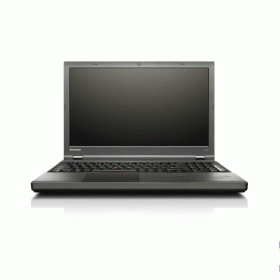
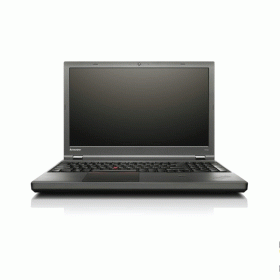

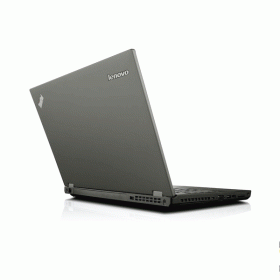

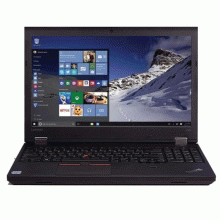
The Refurbished Lenovo ThinkPad T540p is a 15.6-inch Full HD business laptop built around Intel's 4th-generation Core i5-4300M processor—a dual-core, four-thread chip running at 2.6 GHz with turbo to 3.3 GHz, capable of handling everyday office tasks at a budget-friendly price point. With 8GB DDR3 RAM and a 500GB hard drive, this professionally restored machine offers generous storage capacity for documents, files, and applications. The stand-out specification in this configuration is the 1920×1080 Full HD display—sharp, matte, and antiglare—which is a genuine upgrade over the 768p screens found on many laptops in this price range and makes reading, spreadsheet work, and video calls noticeably more comfortable. This unit is supplied with no operating system pre-installed, which means you will need to source and install your own OS before use.
Important: This laptop ships with no operating system installed. You will need to purchase and install Windows (or another OS) separately before the machine is ready to use. Please factor this into your purchase decision. See the OS section below for more detail.
Ideal For
This reconditioned ThinkPad suits technically confident buyers who are comfortable installing their own operating system and want a large-screen, Full HD business laptop at a very low entry price. It's well suited to secondary or backup use, light home office tasks such as document editing and web browsing, or as a dedicated offline machine. The full-size keyboard with number pad and TrackPoint pointing stick make it a comfortable typing machine for data entry or spreadsheet-heavy work. Buyers looking for a plug-in desktop replacement who don't need portability will get the most from this configuration.
Key Features & Benefits
- 1920×1080 Full HD display (15.6-inch, antiglare): The genuine highlight of this configuration—a sharp, matte panel that reduces reflections and makes text, spreadsheets, and video content significantly more readable than standard HD (768p) screens found on many budget laptops
- Intel Core i5-4300M (4th Gen Haswell, dual-core): Turbos to 3.3 GHz with Hyper-Threading providing four virtual cores, which means word processing, email, and light web browsing run without major lag—though the ageing architecture will feel slower than current-generation chips under heavier workloads
- 8GB DDR3 SODIMM RAM: Enough headroom for everyday multitasking including browser tabs, documents, and communication tools running simultaneously
- 500GB hard drive: Generous storage capacity for files, documents, and applications—though the spinning drive is the primary performance bottleneck in this configuration (see performance note below)
- DVD/RW optical drive: Useful for installing software from disc, accessing archived physical media, or burning files—a feature that has largely disappeared from modern laptops
- ThinkPad UltraNav (TrackPoint + touchpad): The iconic red TrackPoint nub allows precise cursor control without lifting your hands from the keyboard—a practical advantage for data entry and fast navigation
- Fingerprint reader: Hardware-level biometric login support once an OS is installed
- MIL-STD-810G rated: Tested for temperature extremes, shock, vibration, and pressure—built to handle daily commuting and business travel more reliably than consumer-grade hardware
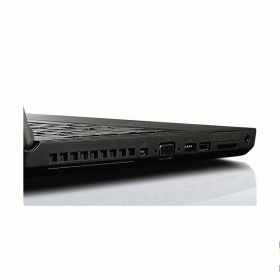
- Full port selection: 3× USB 3.0, 1× USB 2.0 (always-on charging), Mini DisplayPort, VGA, RJ-45 Gigabit Ethernet, SD card reader, and headphone/mic combo—broad compatibility with existing peripherals and displays without adapters
- 720p HD webcam: Ready for video calls once an OS and software are installed
Common Questions
What does "no operating system" mean, and what do I need to do?
This laptop has been data-wiped as part of our secure refurbishment process and ships with a blank drive—no Windows, no Linux, nothing pre-installed. Before you can use it, you will need to install an operating system yourself. The most straightforward option is purchasing a Windows 10 Pro licence (available from Microsoft and authorised resellers) and installing from a USB drive. Windows 11 is not officially supported on 4th-generation Intel processors due to TPM 2.0 requirements, so Windows 10 is the practical choice—though be aware Microsoft's security support for Windows 10 ended in October 2025. Linux distributions such as Ubuntu are a free alternative if you're comfortable with that environment and don't require Windows software. If you are not confident installing an OS yourself, this listing may not be the right fit.
How slow is the hard drive, and should I upgrade to an SSD?
The 500GB spinning hard drive is the single most significant performance limitation in this configuration. On a traditional HDD, boot times typically run 60–90 seconds, and applications take noticeably longer to open than on a modern SSD. For light, occasional use this is manageable—but for daily productivity work, upgrading to a 2.5-inch SATA SSD is strongly recommended. A 240–500GB SATA SSD costs between $40–$90 and can be swapped in without specialist tools, transforming boot times to under 20 seconds and dramatically improving application responsiveness. This is the single most effective upgrade you can make to this machine.
Can it handle video calls and everyday office tasks?
Yes, within its limitations. The i5-4300M with 8GB RAM handles video conferencing, document editing, email, and moderate browser use adequately. The bottleneck you'll notice is the hard drive slowing application launches and OS operations, not the processor. Once an OS is installed and the machine is up and running, day-to-day performance is workable for light office use—especially if the drive is upgraded to an SSD.
What's the WiFi situation?
This unit supports 802.11b/g/n Wi-Fi (2.4 GHz band). It does not include 802.11ac (Wi-Fi 5) or 5 GHz band support. In practical terms this means wireless speeds top out at around 150 Mbps on 2.4 GHz, which is sufficient for standard office use, video calls, and web browsing—but will feel slower than a modern 5 GHz connection on a busy network. Wired Gigabit Ethernet is available and recommended for stable, high-speed connections.
Technical Specifications
At a Glance
- Type: 15.6-inch business laptop with full-size keyboard, numeric keypad, TrackPoint, fingerprint reader, and DVD/RW drive
- Processor: Intel Core i5-4300M — 2 cores / 4 threads, 2.6 GHz base / 3.3 GHz turbo, 3 MB cache (4th Gen Haswell, vPro)
- Memory: 8GB DDR3 SODIMM
- Storage: 500GB SATA HDD — generous capacity, but noticeably slower than SSD; upgrade recommended for daily use
- Optical Drive: DVD/RW — reads and writes CDs and DVDs
- Display: 15.6-inch Full HD (1920 × 1080), antiglare LED-backlit — sharp and comfortable for extended productivity use
- Graphics: Intel HD Graphics 4600 (integrated)
- Operating System: None — no OS installed. Buyer must source and install separately
- Webcam: Yes — 720p HD integrated camera
- Wireless: Intel 802.11b/g/n (2.4 GHz, no 5 GHz / no AC)
- Networking: 1 Gb Gigabit Ethernet
- Bluetooth: Yes — Bluetooth 4.0
- Security: Fingerprint reader, TPM security chip
- Ports: 3× USB 3.0 (1 always-on), 1× USB 2.0, Mini DisplayPort, VGA, RJ-45 Ethernet, SD card reader, combo headphone/mic jack
- Battery: 6-cell Li-Ion
- Colour: Black
- Dimensions: 374.5 × 249 × 26.6 mm
- Weight: Approximately 2.5 kg
- Durability: MIL-STD-810G tested
- Best use: Light office tasks, email, web browsing, document editing, desktop replacement (plugged in), secondary or backup machine
- Not recommended for: Users who cannot install their own OS, heavy multitasking, gaming, video editing, or environments requiring a currently supported OS without additional configuration
Performance & Real-World Use
The ThinkPad T540p occupies the budget end of Reboot IT's laptop range—and its pricing reflects that honestly. The Full HD display is a genuine strength: at 1920×1080, it delivers noticeably sharper text and more screen real estate than the 768p panels on comparably priced alternatives, which makes it well-suited to document work and reading-heavy tasks. The i5-4300M and 8GB RAM combination handles light multitasking adequately once an OS is up and running.
The hard drive is the machine's most significant limitation. In our February 2026 testing, HDD-equipped units took 60–90 seconds to reach the desktop from a cold boot, and application launch times were noticeably sluggish compared to SSD-equipped machines. For occasional or light use this is liveable; for daily productivity work, a SATA SSD upgrade ($40–$90) transforms the experience and is the single most impactful improvement available. The T540p's 2.5-inch drive bay makes this a straightforward swap. The ThinkPad keyboard—with its signature key travel and well-defined pressure point—remains a highlight and is more comfortable for extended typing than most laptops at this price point.
Operating System
This laptop ships with no operating system installed. The 4th-generation Core i5-4300M does not officially meet Microsoft's TPM 2.0 hardware requirement for Windows 11. Windows 10 Pro is the most practical option, though Microsoft's security support for Windows 10 ended in October 2025. Free Linux distributions (Ubuntu, Linux Mint) are a supported alternative for buyers comfortable with that environment. OS installation requires a USB drive (8GB or larger) and access to a licensed OS image or free Linux distribution. If you are not confident performing this step, this listing may not be suitable for your needs.
Cosmetic Condition Guide
Each refurbished Lenovo ThinkPad T540p is graded on cosmetic appearance. Excellent units show minimal wear with clear key lettering and no significant scratches. Good units may have visible scratches, light scuffing, or keyboard shine from regular use. Fair units display heavier cosmetic wear—possible paint chips or dents—though all grades are fully functional and tested to the same standard. Check the product listing for the grade assigned to this unit, and see our full cosmetic condition guide for detailed criteria.
Verified Reboot Refurb Quality Assurance
Every Lenovo ThinkPad T540p goes through Reboot IT's comprehensive refurbishment process before reaching you. This includes secure data wiping, full hardware diagnostics, and component-level testing across processor, memory, storage, display, ports, keyboard, trackpad, fingerprint reader, optical drive, and wireless connectivity—a 40+ point inspection that includes stress testing under load. Only units that clear every checkpoint are approved for sale.
Warranty & Support
3-month warranty provided by Reboot IT. This unit is an older-generation device and carries our 3-month warranty in accordance with Reboot IT's warranty policy for aged hardware. All functional components are covered for the warranty period.
This refurbished ThinkPad T540p suits technically confident buyers who want a full HD large-screen business laptop at a low entry price and are comfortable setting it up themselves—backed by Reboot IT's refurbishment expertise and 3-month warranty.
USB 3.0 |
| Webcam |
| Hardware Connectivity | DisplayPort,USB 3.0,Gigabit Ethernet,VGA |
| Features | Bluetooth,Built-in Webcam,Wi-Fi |
| Graphics Processing Type | N14M-GS7 |
| Condition | A |
| Model | Thinkpad T540p |
| Type | Notebook/Laptop |
| Resolution | 1366x768 |
| Release Date | Q4'13 |
| Processor Model | 4300M |
| Dimensions | 376.6mm x248.1mm x27.9mm |
| Storage Type | HDD (Hard Disk Drive) |
| Operating System Edition | Professional |
| Memory Type | DDR3 SODIMM |
| Cores | 2 |
| Brand | Lenovo |
| Primary Drive | DVD/RW |
| L2 Cache | 3 MB |
| Screen Size | 15.6" |
| Operating System | Windows 10 |
| Processor Type | I5 4th Gen |
| Usage | BYOD,Home,Work |
| Max Turbo Speed | 3.30 GHz |
| Max. Ram | 32GB |
| Processor Speed | 2.60GHz |
| Warranty | 3 months |
| Weight | 2.49kgs |
| Hard Drive Capacity | 500GB |
| GPU | HD GRAPHICS |
| Memory | 8GB |
| Audio Output | Integrated |
| Webcam | Yes |
| Product Line | ThinkPad |
Refurbished Computers - Cosmetic Grading Guide
Our supplier's refurbished hardware is typically graded either "Excellent" or "Good", however, some legacy products were graded under a letter grading system (A, B, C). Please find the definitions for each grade below and contact us if you're uncertain of a device's grade.
Used Smartphone / Refurbished Mobile Phones
"Excellent" Grade
Devices in this category appear like new, with very minor wear. Expect light or fine scratches on the screen that are shallow enough not to catch on a fingernail. The edge around the glass is virtually flawless, save for possible light scratching around the power port. The back plate may show light/fine scratches, including on the Apple logo, with any discoloration being minimal.
"Good" Grade
These devices are characterized by being fully tested and functional even if they have body scratches, minor paint chips, or a small hairline crack on the screen. Screens are free from dead pixels but may exhibit slight scratching from moderate use.
Refurbished Desktops, Laptops and Monitors
"Excellent" Grade - Laptops
Reserved for units that show barely any signs of previous use, these laptops may exhibit very minor scuffing or abrasions, associated only with minimal standard use. The keyboards show light wear, and importantly, the screens are pristine, free from any scratches, cracks, chips, dead pixels, dark spots, discoloration, or blemishes.
"Excellent" Grade - Desktops
Desktop PCs in the "Excellent" grade category are free from deep scratches, cracks, paint chips, or any broken/missing pieces, ensuring a sleek and almost-new aesthetic.
"Excellent" Grade - Monitors
"Excellent" grade is reserved for units that show evidence of very little to no previous use. Any wear on an "Excellent" Display, including housing/frame and/or external surfaces (i.e. Frame) is associated with standard minimal use. "Excellent" units may have minor scuffing and / or minor abrasions on plastics with from standard light previous use."Excellent" Displays will feature no scratches, cracks, chips, dead pixels, dark spots, discoloration or blemishes. Units will only feature the standard minimal wear and tear that is associated with a used unit.
"Good" Grade - Laptops
"Good" laptops may feature one or several small dings or dents on covers and / or small paint chips on the surface or small hairline cracks in the bezel. Laptop screens may feature uneven light diffusion in screen and may feature subtle blemishes. "Good" Laptops will not feature cracks screens but may feature slight scratching, dead pixels or white spots on the screen.
"Good" Grade - Desktops
"Good" grade desktops may have light scratches on external body and may feature more excessive unit housing and/or external case wear than "Excellent" units, including wear on case / lid. "Good" PCs may feature one or several small dings or dents on covers and / or small paint chips on the surface.
"Good" Grade - Monitors
Displays in the "Good" grade have been fully tested and are functional but may include scratches on body, small paint chips, minor cracks on body, loose and/or wobbly bases. "Good" Display screens may feature uneven light diffusion in screen and may feature subtle to moderate blemishes. "Good" Displays will not feature cracks on screens but may feature slight scratching on screen surfaces from moderate use or wear, dead pixels or white spots on the screen.
Legacy letter grading
Used Smartphone / Refurbished Mobile Phones
A Grade
- No chips, scratches or cracks on the front glass and housing
- No missing or alternative parts
- No sign of liquid damage
- Battery cannot be swollen
B Grade – Same as A Grade except:
- May have light scuffs but no chips or cracks
- Light scratches on housing or front glass
C-Grade – Same as B Grade except:
- Unlimited long shallow scratches on the front glass
- No chips or cracks on the front glass
- Unlimited scratches, chips/dents on back cover housing and corners
- Minor cracks allowed
- Customized housing and aftermarket covers allowed
Refurbished Desktops, Laptops and Monitors
A-Grade
- Overall excellent to very good cosmetic condition. Some may be pristine, others may have light scratches or minor blemishes
- Laptops may have some shiny areas around the keyboard such as the space bar, touchpad or touchpad buttons
- Keyboard keys will be in excellent condition
- Laptop and monitor screens will be blemish free
- Cosmetic blemishes will not impact the overall functionality or performance of the device
B-Grade
- Will have some cosmetic blemishes that include scratches and/or other imperfections
- Minor scratches and dents on the housing
- Laptops may have shiny keys or shiny surfaces around the keyboard however all characters will be legible
- Laptop and monitors screens will have imperfections such as minor scratches, minor chips and/or white spots. There will be no cracking on the screen
- Have the same warranty as A Grade
- Pricing will be cheaper than A Grade
C-Grade
- Same as B-Grade except may have unlimited scratches/blemishes on the screen
- May have cracks/chips or dents on the housing
- Have the same warranty as A Grade
- Pricing will be cheaper than B Grade